
FIND YOUR PARTS
Loading vehicle data...
Enter your Vehicle Identification Number to find compatible parts.
Coming Soon


1. Remove the DVD navigation.
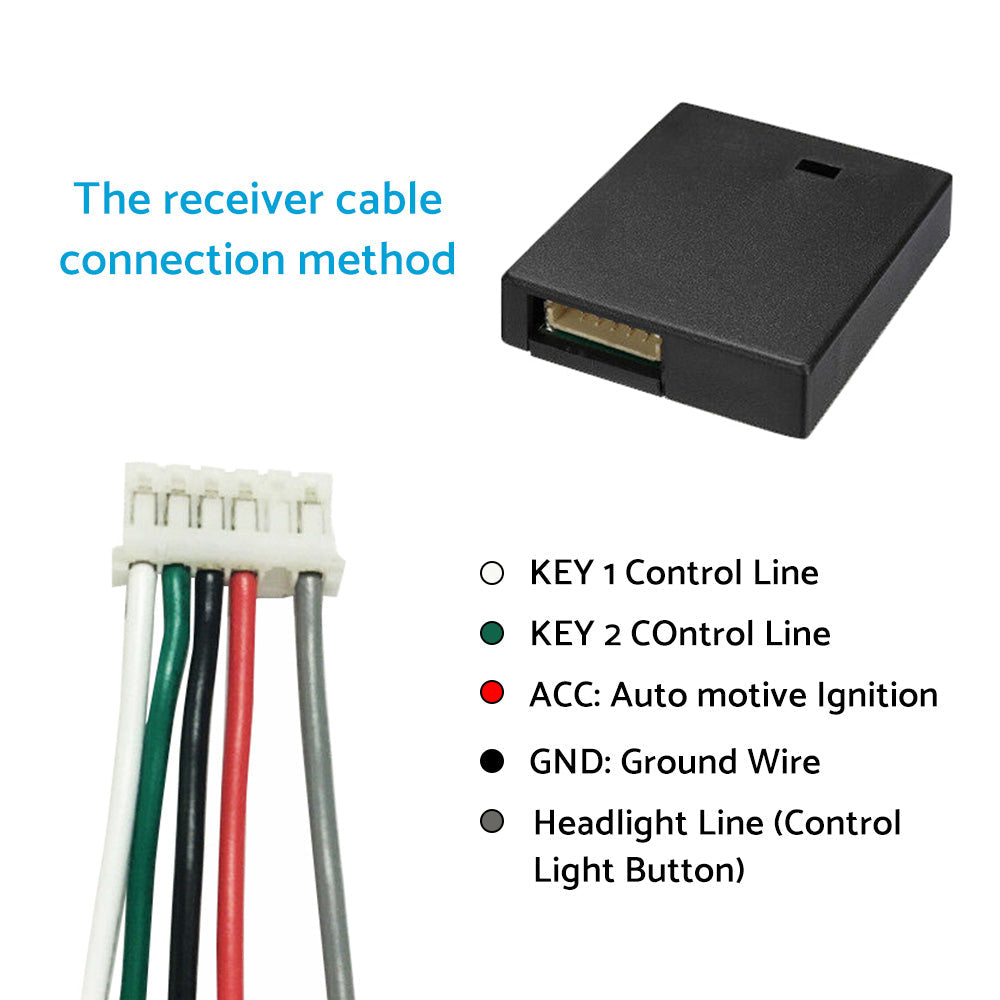
2. Locate steering wheel multi-function control lines, ACC line, and ground wire (consult navigator manual for specifics).
3. Connect receiver box lines according to markings (ACC, GND, KEY1, KEY2). Position antenna close to steering wheel away from navigation host.
4. Use DVD navigation settings to perform multi-function button learning.
2 x Controller
1 x Receiver Box
1 x Cable
4 x Screws and Nuts
- 1. Smart 2nd generation
- 2. Quick installation improves driving safety.
- 3. Up to 10 customizable keys supporting common car operations.
- 4. Wireless connection, no need to remove the original steering wheel.
- 5. Comfortable touch, less space usage; side button reduces accidental operation.
- 6. Integrated arc design fits various steering wheels and works with covers.
- 7. Compatible with most DVD navigations with direction control.
- 8. LED noctilucent display.
- 9. Bluetooth function.
- 10. Two-way wireless communication; button light syncs with vehicle headlights.
- **Requires car navigator with steering wheel learning function**
| TypeController | |
| MaterialABS+PC | |
| ColourBlack | |
| ShapeHalf Moon | |
| PlacementSteering Wheel | |
| Number of keys5 or 10 | |
| Controller Size (L*W*H)10 x 4.4 x 3.5 cm / 3.9" x 1.7" x 1.4" | |
| Receiver Box Size (L*W*H)4.3 x 3.7 x 1 cm / 1.7" x 1.45" x 0.45" |
| Make | Model | Years | Submodel | Engine |
|---|